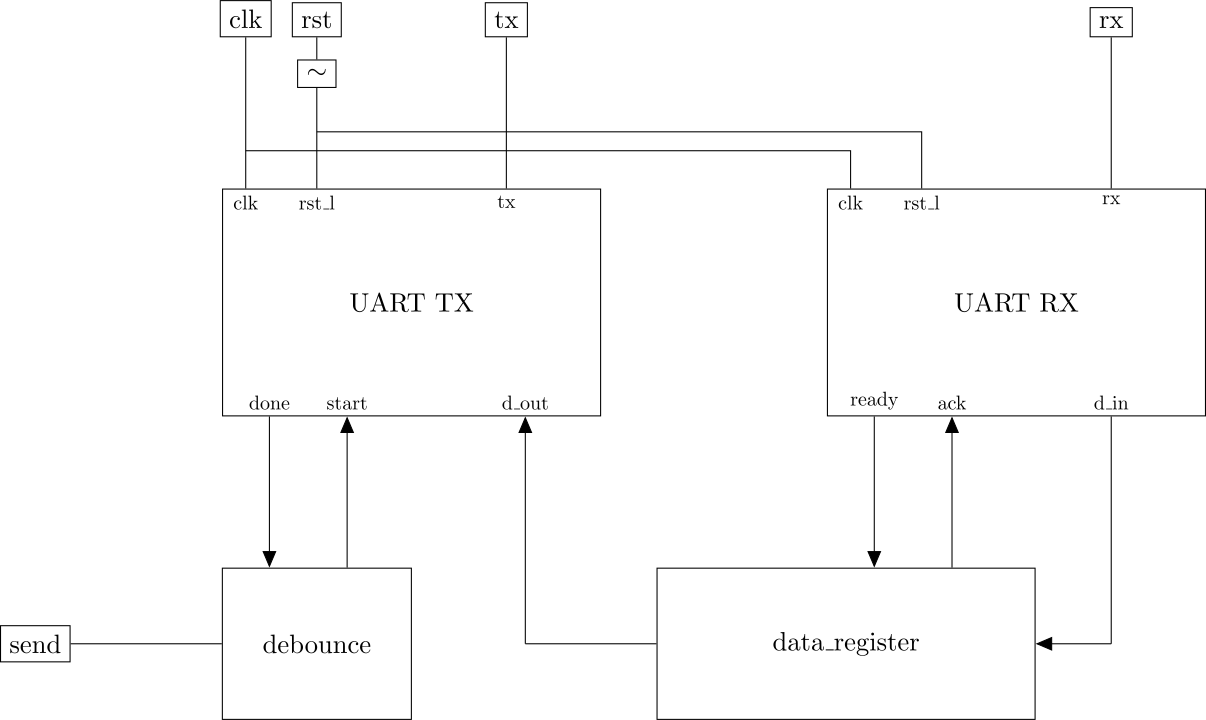
In this assignment, you will combine the uart_rx and uart_tx modules to create a
bi-directional interface. You will demonstrate the interface using a PC
terminal. Your design will record the most recent keystroke received
from the PC, and repeat it back to the PC when a button is pressed.
uart_rx and uart_txCopy your transmitter and receiver modules into the src/
directory, and add them to the git repository.
top moduleNext, create a top module
contining an instance of uart_tx
and uart_rx, as well as a
specialized debouncer and a
data_register module with the
I/O ports and connections as shown in the figure below.
Note that all modules have clk and rst_l inputs, although not shown in
every case.
debouncerThe debouncer should take input from the send button and produce the start/done
handshaking whenever the button is pressed.
data_registerCreate a module named data_register with these I/O
ports:
clk and rst_ld_in (8 bits)d_out (8 bits)readyackInitialize d_out to the
68h.
Normally ack and ready are 0.
When ready rises to 1, d_out is assigned the value from d_in. At the same time, ack is set to 1.
After ack rises, ready should clear to 0, and then
ack should clear back to 0.
A testbench is provided for
this assignment. It does three things in parallel:
send button
pressesrx signaltx signalThe button presses are modeled by a random number in this code segment:
   reg [3:0] send_rnum;

   initial begin

      while (1) begin
         #200000;                // Wait for a while
         send_rnum = $random();  // Get a random number between 0 and 15

         // Probability 1/16:
         if ((send_rnum == 0) && !DUT.start) begin
            send = 1;

            $write("SEND pressed\n");
            $fwrite(fid,"SEND pressed\n");
            tx_count = tx_count + 1;
         end
         else begin
            send = 0;
         end
      end
   end
This model uses a while loop to
delay 200ns, then raise the send
signal with probability 1/16 (there are 16 possible values of
send_rnum and only one of those
values is 0). The event is delayed if a transmission is alreay in
progress, as indicated by DUT.start. The byte latency at 9600
baud is (1/9600)10 = 1ms. Combining these delays, on average, the
button presses will occur every (200ns 16) + (1ms) = 4.2ms during
the simulation.
To emulate a PC terminal, the testbench models UART TX/RX processes using #delay statements. The transmission model is shown in this segment:
   // -----------------------------------------------
   // Send UART byte
   // -----------------------------------------------
   integer rx_index = 0;
   reg [2:0] rnum;

   initial begin
      rx = 1;

      while (1) begin
         #104170;
         rnum = $random();

         if (rnum == 0) begin
            d_in = $random();

            $display("Transmitting %xh ('%c') to module",d_in,d_in);

            rx = 0; // START bit

            for (rx_index=0;rx_index<8;rx_index=rx_index+1) begin
               #104170;
               rx = d_in[rx_index];
            end
         end
         #104170;
         rx = 1;    // STOP bit
         #104170;
      end
   end
The #delay statements use the 9600 baud clock period, 104170ns. As
with the button-press simulator, a while loop is
used with a random number. In this case, the possible values are 0 to 7,
each with probability 1/8. A transmission will occur, on average, every
(104170ns * 8) = 833us during the simulation. To simulate the actual
transmission, rx is pulled to 0 to initiate
the START bit. A for loop sends
the individual data bits, one at a time, each time preceded by a period
delay. Lastly the rx signal is
set to 1
to send the STOP bit.
The testbench receiver model
is shown in this code segment:
   // -----------------------------------------------
   // Receive UART byte task
   // -----------------------------------------------
   integer tx_index = 0;

   initial begin
      d_out = 0;

      while (1) begin
         #100;

         if (!tx) begin
            #1000;   // Add margin for timing skew

            for (tx_index=0;tx_index<8;tx_index=tx_index+1) begin
               #104170;
               $write(">%b ",tx);
               d_out[tx_index] = tx;
            end

            #104170;
            #104170;
            if (!tx)
              $display("BAD STOP BIT");
            $display("Received %xh ('%c') from module",d_out,d_out);
         end
      end
   end // initial begin
This process implements the transmitter in reverse. The message
begins with a START bit when tx
drops to 0. You may
notice the extra delay of #1000 after
the START bit. This is effectively the same as the sync delay specified in the UART RX
assignment. The purpose is to allow the tx wire to stabilize before reading
its value.
When the simulation runs, the output will look something like this:
SEND pressed
Received 68h ('h') from module
Transmitting 89h ('<89>') to module
SEND pressed
Received 89h ('<89>') from module
Transmitting 2ah ('*') to module
Transmitting 79h ('y') to module
Transmitting 2dh ('-') to module
SEND pressed
Received 2dh ('-') from module
It can be helpful to add more $display or
$write
statements in your modules. These statements are evaluated during
simulation, but ignored for synthesis. For example, some $display lines
can be added in the uart_tx
state machine:
         case (state)
           WAIT:
             begin
                if (start) begin
                   bit_index <= 0;  // start at LSB
                   tx        <= 0;  // start bit
                   state     <= SEND;
                   $display("\tUART: transmitting %xh ('%c')", d_out, d_out);
                end
                else begin
                   tx   <= 1; // idle signal
                   done <= 0; // not done, ready for data
                end
             end
           SEND:
             begin
                tx    <= d_out[bit_index];
                if (bit_index == 7) begin
                   state <= STOP;
                end
                else begin
                   bit_index <= bit_index + 1;
                end
             end
           STOP:
             begin
                tx <= 1;

                if (start) begin
                   $display("\tUART: sending STOP bit");

                   done <= 1; // Signal that the transmission is complete
                end
                else begin
                   done <= 0;
                   state <= WAIT;
                end
             end
         endcase
With the inserted $display
statements, the testbench output
offers more detail:
SEND pressed
        UART: transmitting 68h ('h')
Transmitting aah ('<AA>') to module
        UART: sending STOP bit
Received 68h ('h') from module
Transmitting 89h ('<89>') to module
SEND pressed
        UART: transmitting 89h ('<89>')
        UART: sending STOP bit
Received 89h ('<89>') from module
Transmitting 2ah ('*') to module
Transmitting 79h ('y') to module
Transmitting 2dh ('-') to module
SEND pressed
        UART: transmitting 2dh ('-')
        UART: sending STOP bit
Received 2dh ('-') from module
You may freely add $display
statements to uart_rx, debouncer, data_register in order to get a more
detailed picture of your design’s internal activity.
Implement the design on the Basys3 board and test using a PC terminal. The procedure is essentially the same as for the UART TX assignment, with these additional steps:
send button and you should see the
letter ‘h’send button again
and the character should be repeated back in the terminal.Take a short video showing your test and upload it to Canvas.
Turn in your work using git:
git add src/*.v *.v *.rpt *.txt *.tcl *.bit *.xdc
git commit . -m "Complete"
git push origin main